Introduction
Creating beautiful images used to take years of design training and expensive software. Not anymore. In 2026, the best AI image generator tools are free, fast, and shockingly good and anyone can use them, even if you have zero artistic skills.
Whether you are a blogger looking for custom thumbnails, a small business owner who needs product visuals, a student working on a presentation, or just someone who loves being creative free AI image generators have something for you. You simply type what you want to see, and within seconds the tool creates a stunning image from scratch.
But with so many options out there, which ones are actually worth your time? In this guide, we have rounded up the best free AI image generator tools available in 2026. We will walk you through what each tool does, who it is best for, and share practical tips to help you get the most out of them. Let’s dive in.
What Is an AI Image Generator and How Does It Work?
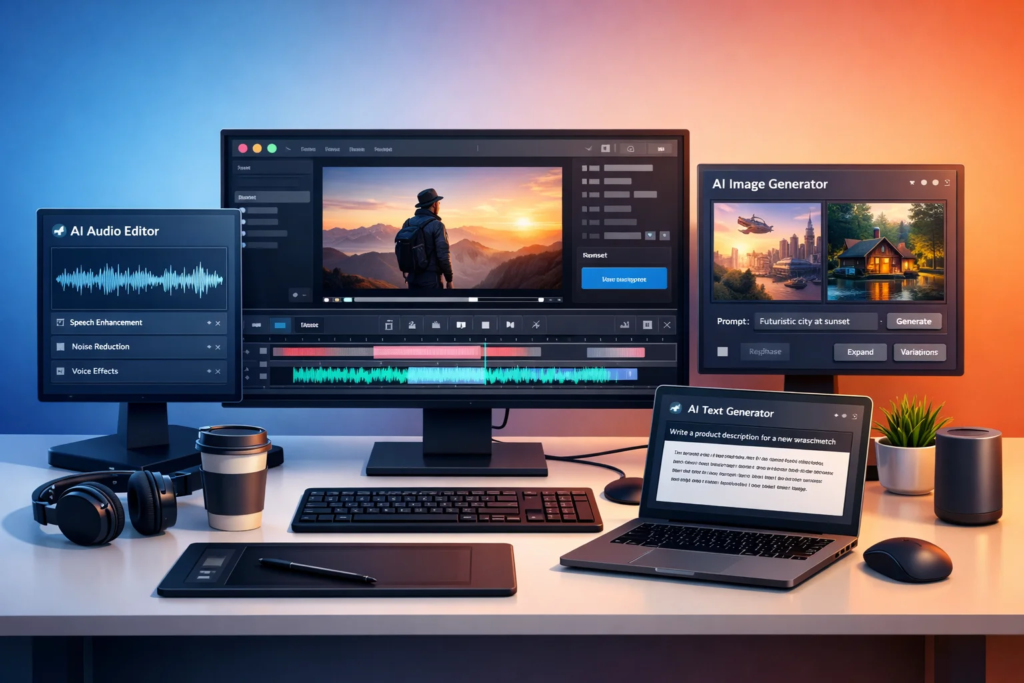
An AI image generator is a software tool that uses artificial intelligence to create images based on text prompts you type in. You describe what you want for example, a sunset over a mountain with a fox sitting on a rock and the AI turns your words into a real image within seconds. These tools are powered by deep learning models trained on millions of images. The most popular technology behind them is called diffusion models, which start with random noise and slowly refine it into a detailed image based on your description. Some tools also use transformer-based models similar to the ones that power language AI.
You do not need any design skills, coding knowledge, or special hardware. Most of the best free AI image generator tools run directly in your browser. The process is simple:
- Open the tool in your browser
- Type a detailed description of the image you want
- Choose a style if the tool offers one
- Click generate and wait a few seconds
- Download your image for free
Understanding this basic process helps you get better results. The more specific and descriptive your prompt, the better the image will be.
Adobe Firefly Best for Clean and Professional Results
Adobe Firefly has quickly become one of the most trusted free AI image generator tools available today. What makes it stand out is that it was trained on licensed and public domain content which means the images it creates are safe to use commercially without copyright worries. The free plan gives you a generous number of monthly credits to generate images and the quality is consistently high. The interface is clean and easy to navigate, even for beginners. You can control things like lighting, color tone and camera angle through simple menus.
Pro Tip: Try using descriptive style words in your prompt, like cinematic lighting, flat design or watercolor illustration to dramatically improve your results in Firefly.
Adobe Firefly is best suited for content creators, bloggers, and small business owners who want polished, professional-looking images. It integrates well with other Adobe tools if you use Photoshop or Express, making your workflow smoother.
Microsoft Designer & Bing Image Creator Best for Everyday Use
If you have a Microsoft account, you already have access to two powerful free AI image generator tools: Microsoft Designer and Bing Image Creator. Both use OpenAI’s DALL·E technology under the hood which means they produce high-quality, detailed images. Bing Image Creator is perhaps the most accessible free tool out there. You simply visit the Bing Image Creator page, type your prompt, and get four image variations back in seconds. No signup is required beyond a basic Microsoft account that most people already have.
Microsoft Designer goes a step further by helping you create social media posts, banners and presentations using your generated images. It is a full creative tool, not just an image generator. The free tier is quite generous and covers most everyday needs.
Bing Image Creator
Free: Fast, no-fuss image generation powered by DALL·E. Great for quick ideas.
Microsoft Designer
Free Tier: Full creative suite with AI image generation, templates and social media tools.
Google’s Gemini Imagen Best for Photorealistic Images
Google’s Imagen technology, now available through Gemini, is one of the most powerful free AI image generator tools when it comes to photorealistic results. If you need an image that looks like a real photograph rather than digital art, Imagen is worth exploring.
The tool is deeply integrated into Google’s ecosystem. You can access it through Google Gemini, and it works especially well when you combine it with Google Docs or Google Slides to add custom visuals to your work. The quality of human faces, natural landscapes, and product shots is impressive even on the free plan.
Google has put strong safety filters in place, which is a good thing for families, educators, and businesses. The outputs are consistently appropriate, making it one of the safest tools to use in professional or educational settings. The best AI image generator is not always the most powerful one it is the one that fits your workflow and gives you consistent, usable results.
Canva AI Image Generator Best for Social Media Creators
Canva has been a go-to design tool for years and their built-in AI image generator makes it even more valuable especially for social media creators and non-designers. The free plan lets you generate a limited number of AI images each month and they blend seamlessly into your Canva designs. What makes Canva’s AI image tool special is the context it lives in. Once you generate an image, you can immediately drop it into a post, story, presentation or flyer template. You can resize, add text, apply filters and publish all within the same platform. There is no need to download and re-upload to another tool. Canva also offers style presets that make it easy to get consistent results. Here are some style categories you can explore:
- Photo: for realistic-looking images
- Illustration: for cartoon or graphic-style visuals
- Watercolor: for soft, artistic feels
- Retro: for vintage aesthetics
For anyone already using Canva for their content, the AI image generator feels like a natural extension of an already familiar workflow.
Stable Diffusion (via DreamStudio or Hugging Face) Best for Advanced Users
Stable Diffusion is the gold standard for open-source AI image generation. While the core model itself is free to run, most people access it through user-friendly interfaces like DreamStudio or the free spaces hosted on Hugging Face. The reason Stable Diffusion is loved by advanced users is its level of control. You can adjust the number of inference steps, guidance scale, seed values, and image dimensions. You can also use negative prompts telling the AI what NOT to include in the image which significantly improves output quality.
Negative Prompt Tip: Add terms like blurry, low quality, distorted hands and watermark in the negative prompt field to avoid common AI image flaws.
Hugging Face hosts many free Stable Diffusion spaces where you can generate images without signing up or paying anything. The results are competitive with paid tools when you use detailed prompts and the right settings. This is the tool for users who want maximum creative freedom.
NightCafe Creator Best for Art Styles and Creative Exploration
NightCafe Creator is one of the most fun free AI image generator tools if you want to experiment with artistic styles. It offers multiple AI models in one place, including Stable Diffusion, DALL·E and its own algorithms so you can compare results and pick what works best. The free plan gives you daily credits that refresh every 24 hours. This makes it great for casual users who want to create a few images each day without committing to a subscription. You can also earn extra credits by participating in the NightCafe community, such as liking and commenting on other users’ creations.
NightCafe offers a wide range of artistic style presets:
- Oil painting and impressionist styles
- Cosmic and surreal visuals
- Anime and manga-inspired art
- Architecture and concept art renders
The community aspect is a bonus you can browse what others are creating, get inspiration for your prompts and even join themed creation challenges.
Tips to Get Better Results From Any Free AI Image Generator
No matter which free AI image generator tool you choose the quality of your output depends heavily on how well you write your prompts. Here are some practical tips that work across almost every tool:
- Be specific about the subject: Instead of a dog, try a golden retriever puppy sitting in a field of sunflowers, golden hour lighting.
- Describe the style: Add words like digital painting, 3D render, cinematic or minimalist flat design.
- Set the mood: Use emotional descriptors like peaceful, dramatic, mysterious or cheerful.
- Specify the aspect ratio or format: Mention landscape, portrait or square if the tool supports it.
- Iterate fast: Generate multiple variations and use the best one as a starting point for a refined prompt.
Example Prompt: A cozy home office at night, warm lamp light, bookshelves in the background, a steaming mug of coffee on the desk, photorealistic, 4K detail. This level of detail produces far better results than a home office.
Also remember: free tools often have daily limits. Plan your generations, save your best prompts in a notes app, and reuse strong templates to save your credits for the images that matter most.
Frequently Asked Questions
Q1. Are free AI image generator tools really free or do they have hidden costs?
Most of the tools listed here have genuinely free tiers that let you create images without paying. However, free plans usually come with monthly or daily limits on how many images you can generate. Tools like Bing Image Creator and Canva (free plan) are free to use within their limits. Premium plans exist if you need more volume but for casual or moderate use, the free versions are more than enough.
Q2. Can I use AI-generated images for commercial purposes?
It depends on the tool. Adobe Firefly is specifically designed for commercial use and trained on licensed content. Microsoft’s Bing Image Creator and Canva generally allow personal and commercial use within their terms. Always check the specific Terms of Service of each tool before using images for commercial projects, ads, or products you plan to sell.
Q3. Which free AI image generator is best for beginners?
For beginners, Bing Image Creator and Canva AI are the easiest to start with. They require no technical knowledge, have simple interfaces and deliver good results with basic prompts. Canva is especially great if you also want to use your images in social media posts or presentations right away, since everything is connected in one place.
Q4. How do I write a good prompt for an AI image generator?
A good prompt is detailed, specific and descriptive. Mention the subject, the setting or background, the lighting, the art style and the mood. For example, instead of a cat, write a fluffy white cat sitting on a windowsill, rainy day outside, cozy indoor lighting, watercolor illustration style. The more context you give, the closer the AI’s output will match your vision.
Q5. Do AI image generators work on mobile phones?
Yes, most of the best free AI image generator tools work on mobile browsers, so you can use them on your smartphone or tablet without downloading any app. Some tools like Canva and Microsoft Designer also have dedicated mobile apps that make the experience even smoother. You can generate, edit and download your images entirely from your phone.
Conclusion
The world of free AI image generation has never been more exciting than it is in 2026. Whether you need a quick illustration for a blog post, a custom background for a presentation or a creative visual for your social media, there is a free tool that can do the job beautifully. Here is a quick summary of what we covered to help you choose the right tool:
- Adobe Firefly: Best for professional, commercially safe images
- Bing Image Creator: Best for quick, no-fuss everyday generation
- Microsoft Designer: Best all-in-one free creative suite
- Google Imagen (Gemini): Best for photorealistic results
- Canva AI: Best for social media creators
- Stable Diffusion: Best for advanced, high-control users
- NightCafe Creator: Best for artistic styles and community
The biggest lesson from this guide is simple: you do not need to spend money to create great AI images. Start with one or two tools, practice writing detailed prompts and you will be amazed at what you can create. The best free AI image generator tool is the one you actually use so pick one today and get started.