
Introduction
Let’s be honest writing a blog post from scratch takes time. You need to research the topic, find the right keywords, write a compelling intro, structure your content, and then optimize everything for Google. That’s a lot of work, especially if you’re managing multiple blogs or running a content marketing strategy on your own. This is where ChatGPT prompts for writing SEO blog posts come in handy.
ChatGPT is an AI writing assistant that can help you write, brainstorm and organize your blog content in a fraction of the time. But here’s the thing the quality of what you get depends almost entirely on how you ask. A vague prompt gives you vague content. A well-crafted prompt gives you something you can actually publish.
In this guide, you’ll learn exactly how to use ChatGPT prompts to write better SEO blog posts faster. Whether you’re a beginner blogger, a freelance writer, or a digital marketer, this article will save you hours every week.
Let’s get into it.

Why ChatGPT Prompts Matter for SEO Writing
Before we dive into the prompts themselves, it helps to understand why prompts make such a big difference in SEO writing. ChatGPT doesn’t automatically know your niche, your audience, or what Google wants to rank. It works based on the instructions you give it. When you write a clear, specific prompt, you’re essentially telling ChatGPT to think like an SEO content writer and that changes everything.
Good prompts help you:
- Target the right keywords naturally throughout your content
- Write in the right tone for your readers
- Structure articles with proper headings that search engines understand
- Avoid fluff and filler content that hurts your rankings
Think of ChatGPT as a talented assistant who needs clear direction. If you walk in and say “write me a blog post,” you’ll get something generic. But if you say “write a 1,500-word SEO blog post for beginners about meal prep, targeting the keyword ‘easy meal prep ideas,’ using a friendly tone,” you’ll get something far more useful. The prompts in this article are designed to give you that kind of precision and speed up your workflow significantly.
How to Write a Strong Keyword Research Prompt
Every great SEO blog post starts with the right keywords. ChatGPT can help you brainstorm keyword ideas even before you open a tool like Ahrefs or Google Keyword Planner.
Here’s an example of a strong keyword research prompt:
“I run a blog about home gardening for beginners. Give me 15 long-tail keyword ideas I can target for blog posts. Focus on keywords with informational intent that beginner gardeners would search for.”
Why does this work? Because you’ve told ChatGPT three important things: your niche, your audience, and the type of search intent you’re targeting. That context produces much more relevant results.
Tips for keyword research prompts:
- Always mention your niche or industry
- Specify your audience (beginners, professionals, parents, etc.)
- Ask for long-tail keywords they’re easier to rank for
- Request keywords grouped by topic clusters if you want to build a content strategy
You can also ask ChatGPT to analyze a keyword for you: “Is the keyword ‘best running shoes for flat feet’ informational, commercial, or transactional? How should I approach writing content for it?”
This kind of prompt helps you understand search intent before you write a single word which is exactly what SEO-focused writing requires.
Crafting the Perfect Post Outline Prompt
Once you have your keyword, the next step is building a solid outline. A good outline is the backbone of any SEO blog post. It keeps your writing focused, helps you cover subtopics that Google looks for, and makes the whole drafting process faster.
Here’s a prompt that works really well for outlines:
“Create a detailed SEO blog post outline for the keyword ‘how to start a podcast for beginners.’ Include an H1 title, an introduction, 7 H2 headings, a FAQ section with 4 questions and a conclusion. The target audience is people with no podcasting experience.”
This prompt is specific about structure, which means ChatGPT will give you something you can follow step by step.
When building outline prompts, keep in mind:
- Ask for both H2 and H3 headings if your post needs depth
- Include instructions for FAQ and conclusion sections
- Mention the word count target if you have one
- Ask ChatGPT to include LSI keywords (related terms) in the subheadings
A well-structured outline does two things: it helps Google understand what your post is about, and it helps your readers navigate your content easily. Both of those things improve your SEO performance over time.
Writing Engaging Introductions with ChatGPT
The introduction of your blog post is one of the most important parts for both readers and SEO. If someone clicks on your post and the intro is boring, they’ll leave and that hurts your bounce rate, which can negatively affect your rankings.
Here’s a prompt to write a strong intro:
“Write a 150-word introduction for a blog post about ‘ChatGPT prompts for writing SEO blog posts.’ Start with a relatable problem that bloggers face, then introduce ChatGPT as a solution, and end with a preview of what the reader will learn. Keep the tone conversational and friendly.”
Notice how the prompt gives ChatGPT a structure to follow: problem → solution → preview. That’s a classic content formula that works well for blog posts.
Tips for introduction prompts:
- Ask for a hook that connects emotionally with the reader
- Include the primary keyword naturally in the first 100 words
- Keep it concise 100 to 200 words is usually enough
- Ask for a specific tone (professional, casual, motivational, etc.)
You can also test multiple versions by asking ChatGPT to “write 3 different introductions for this blog post” and then pick the one that feels best. Giving yourself options is one of the smartest ways to speed up your writing process.
Generating Body Content That Ranks on Google
Writing the body of a blog post is where most people get stuck. You have your outline, but filling in each section with valuable, original-feeling content takes time. ChatGPT can help you draft each section quickly as long as your prompts are specific.
Here’s an example:
“Write a 200-word section for a blog post about the keyword ’email marketing tips for small businesses.’ The heading is ‘How to Write Subject Lines That Get Opened.’ Include 2 practical tips with brief explanations, and keep the language simple and easy to read. Avoid generic advice.”
The key phrase here is “avoid generic advice.” This pushes ChatGPT to go beyond obvious statements and give more actionable, specific content.
Things to include in body content prompts:
- The exact heading or subheading you’re writing for
- A word count target for that section
- Instructions on tone and reading level
- Any specific examples, statistics, or facts you want included
Once ChatGPT gives you a draft, review it and add your own voice, examples from your experience, or updated statistics. This combination of AI speed and human touch is what makes content both SEO-friendly and genuinely useful for readers.
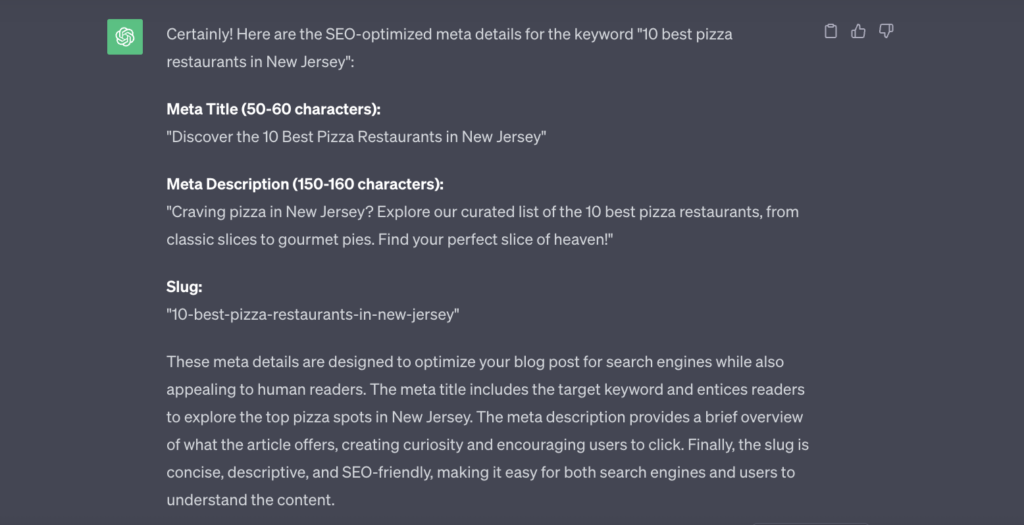
Writing Meta Descriptions and Title Tags Faster
Meta descriptions and title tags are small but powerful. They appear in Google’s search results and directly influence whether someone clicks on your link or scrolls past it. Writing them well is a skill and ChatGPT can help you do it in seconds.
Try this prompt:
“Write 3 SEO-optimized title tags and meta descriptions for a blog post targeting the keyword ‘best budget laptops for students 2025.’ Each title should be under 60 characters. Each meta description should be under 155 characters and include a clear benefit and call to action.”
This prompt gives ChatGPT strict limits, which forces it to be concise exactly what you need for meta content.
Quick tips for meta content prompts:
- Always include character limits in your prompt
- Ask for the main keyword to appear in both the title and description
- Request a CTA (call to action) like “Find out more” or “Learn how”
- Ask for multiple versions so you can A/B test
Good meta content doesn’t just help with SEO it also acts like a mini advertisement for your article. When readers see a clear, compelling description, they’re more likely to click. Higher click-through rates send positive signals to Google, which can help your rankings over time.
Using ChatGPT to Improve Readability and Flow
Even if your content covers all the right topics, it won’t perform well if it’s hard to read. Google uses readability as one signal for content quality. More importantly, readers abandon confusing or dense content quickly.
Here’s a prompt to improve readability:
“Rewrite this paragraph to make it easier to read. Use shorter sentences, simpler vocabulary, and an active voice. The target reading level should be Grade 7 or lower. Here is the original paragraph: [paste your text here]”
This is one of the most useful editing prompts you can use. It transforms clunky drafts into smooth, reader-friendly content in moments.
Other readability prompts to try:
- “Break this section into shorter paragraphs and add transition sentences between them.”
- “Suggest 3 places in this blog post where I could add a bullet point list for clarity.”
- “Check this paragraph for passive voice and rewrite any passive sentences as active.”
When your content flows naturally and is easy to skim, readers stay on your page longer. That time-on-page metric matters a lot for SEO. The easier your content is to consume, the better it performs both for readers and search engines.
Creating FAQ Sections That Capture Featured Snippets
FAQ sections are goldmines for SEO. They often get picked up by Google as featured snippets those answer boxes at the top of search results that get the most clicks. Writing a good FAQ section can significantly boost your visibility.
Here’s a prompt that works great:
“Create an FAQ section for a blog post about ‘ChatGPT prompts for writing SEO blog posts. Include 5 questions that people commonly search for on Google. For each question, write a clear, concise answer in 2–4 sentences. Format them as Q&A pairs.”
The FAQ section in your post also naturally targets multiple long-tail keywords, which helps your content rank for more search queries without extra effort.
Tips for FAQ prompts:
- Ask ChatGPT to base questions on “People Also Ask” style queries
- Keep answers between 40 and 60 words for best featured snippet chances
- Use the exact phrasing that searchers use (natural language)
- Add schema markup later using your CMS or a plugin to boost eligibility
A strong FAQ section can do double duty it helps your readers get quick answers and gives Google exactly the format it loves for featured results. That’s a win on both fronts.
FAQ
Q1: What are ChatGPT prompts for blog posts?
ChatGPT prompts for SEO blog posts are specific instructions you give to ChatGPT to help it generate blog content that is optimized for search engines. A good prompt includes your keyword, audience, tone, and content structure, so the output is relevant and useful right from the start.
Q2: Can ChatGPT write complete blog posts that rank on Google?
ChatGPT can write full blog post drafts, but they work best when you review and personalize them. Adding your own examples, updating facts, and injecting your unique voice makes AI-assisted content stronger and more likely to rank. Think of ChatGPT as your writing assistant, not a replacement for human judgment.
Q3: How specific should my ChatGPT prompts be?
The more specific, the better. Include details like your target keyword, audience type, word count, tone of voice and the structure you want. Vague prompts produce generic results. Specific prompts save you editing time and produce content that’s closer to publish-ready.
Q4: Are there any risks to using ChatGPT for blog writing?
There can be risks if you publish AI content without reviewing it. ChatGPT can sometimes produce outdated information or generic statements that don’t add real value. Always fact-check, add original insights and ensure your content genuinely helps readers. Google rewards helpful content AI or human that meets that standard.
Q5: What types of blog content work best with ChatGPT?
ChatGPT works well for how-to guides, listicles, FAQ content, product comparisons and beginner-level explainers. It’s especially useful for drafting outlines, introductions and meta descriptions. For deeply technical or niche topics, use it as a starting point and add your expertise on top.
Conclusion
Using ChatGPT prompts for writing SEO blog posts is one of the smartest ways to speed up your content workflow without sacrificing quality. From keyword brainstorming to writing meta descriptions, ChatGPT can handle a huge portion of the heavy lifting as long as you give it the right instructions.
Here’s a quick recap of what we covered:
- Why prompts are the key to getting useful output from ChatGPT
- How to generate keyword ideas and outlines quickly
- Ways to write engaging introductions and body content
- Prompts for meta descriptions, readability edits, and FAQ sections
The best content creators don’t just use AI blindly they combine AI speed with human creativity and expertise. Use these prompts as your starting point, then bring your own knowledge and voice to the final product. That combination is what produces blog posts that rank, get shared and actually help people.
Ready to start writing faster? Pick one prompt from this guide, test it on your next blog post, and see how much time you save. Once you find what works, build your own personal prompt library and watch your content output grow.
Happy writing and happy ranking!